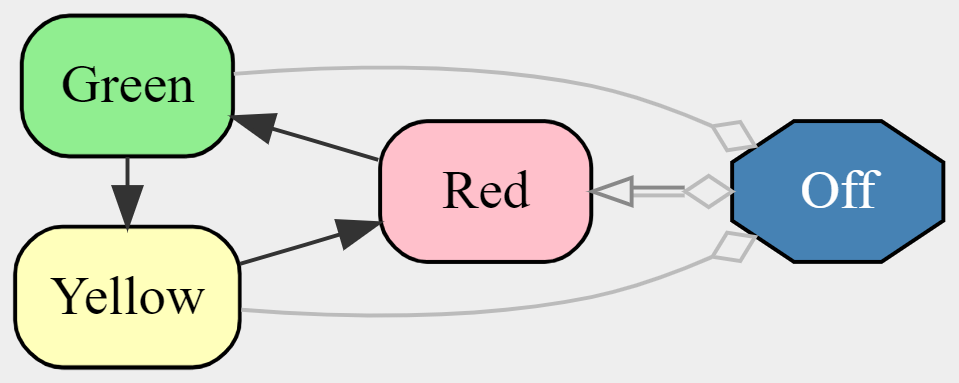
Define a complete state machine in a single line. The first state becomes the initial state automatically.
import { sm } from 'jssm';

const light = sm`Red -> Green -> Yellow -> Red;`;

light.state();            // 'Red'
light.go('Green');        // true
light.state();            // 'Green'

light.go('Red');          // false — not a legal transition from green
light.go('Blue');         // false — not a state at all
Use square brackets to define transitions from multiple states at once. One line instead of many.
// Without lists — repetitive
Red    -> Off;
Yellow -> Off;
Green  -> Off;

// With a list — concise
[Red Yellow Green] -> Off;

// Combine with the main cycle
Red => Green => Yellow => Red;
[Red Yellow Green] ~> Off -> Red;
Attach action names to transitions. Drive the machine with semantic events instead of explicit state names.
const light = sm`Red 'next' -> Green 'next' -> Yellow 'next' -> Red;`;

light.state();          // 'Red'

light.action('next');   // true
light.state();          // 'Green'

light.action('next');   // true
light.state();          // 'Yellow'

light.action('next');   // true
light.state();          // 'Red'
React to transitions with hooks. Integrate your state machine with the rest of your application.
const light = sm`Red 'next' -> Green 'next' -> Yellow 'next' -> Red;`
  .hook('Red', 'Green', () => console.log('GO!'))
  .hook_entry('Red', () => console.log('STOP'));

light.action('next');   // logs 'GO!'
light.action('next');   // (Yellow, no hook)
light.action('next');   // logs 'STOP'
Style states directly in the DSL. Control colors, shapes, line styles, and flow direction for visualization.
const styled = sm`
  Red 'next' => Green 'next' => Yellow 'next' => Red;
  [Red Yellow Green] 'shutdown' ~> Off 'restart' -> Red;

  flow: left;

  state Red    : { background-color: pink;        corners: rounded; };
  state Yellow : { background-color: lightyellow; corners: rounded; };
  state Green  : { background-color: lightgreen;  corners: rounded; };

  state Off : {
    background-color : steelblue;
    text-color       : white;
    shape            : octagon;
    linestyle        : dashed;
  };
`;
Three transition types: => main path, -> legal path, and ~> forced-only. Control what's normal, what's possible, and what requires override.
const machine = sm`
  Off 'start' -> Red;                                  // legal transition
  Red 'next' => Green 'next' => Yellow 'next' => Red;  // main path
  [Red Yellow Green] 'off' ~> Off;                     // forced-only (emergency)
`;

machine.go('Red');                // true  — legal from Off
machine.go('Off');                // false — forced-only, not legal
machine.force_transition('Off');  // true  — force overrides ~>
Write a function that returns a machine. Stamp out as many independent instances as you need.
function gen_traffic_light(name: string): Machine<string> {
  return sm`Red 'next' => Green 'next' => Yellow 'next' => Red;`;
}

const main_and_first   = gen_traffic_light('Main St & 1st Ave');
const oak_and_third    = gen_traffic_light('Oak Rd & 3rd St');
const park_and_bridge  = gen_traffic_light('Park Blvd & Bridge Ln');

main_and_first.state();   // 'Red'
oak_and_third.state();    // 'Red'
park_and_bridge.state();  // 'Red'

main_and_first.action('next');
main_and_first.state();   // 'Green' — only this one moved
oak_and_third.state();    // 'Red'   — independent instance
Attach custom data to your machine. Hooks can read, validate, and transform data during transitions.
import { from } from 'jssm';

const counter = from(
  "idle 'inc' => idle; idle 'dec' => idle; idle 'reset' => idle;",
  { data: 0 }
);

counter.hook_action('idle','idle','inc',   ({data}) => ({ pass: true,       data: data + 1 }));
counter.hook_action('idle','idle','dec',   ({data}) => ({ pass: data > 0, data: data - 1 }));
counter.hook_action('idle','idle','reset', ()         => ({ pass: true,       data: 0          }));

counter.action('inc');   // true
counter.action('inc');   // true
counter.data();          // 2
counter.action('dec');   // true
counter.data();          // 1
counter.action('dec');   // true
counter.action('dec');   // false — hook rejects: can't go below 0
Wire it to HTML — complete, working page:
<!doctype html>
<script type="module">
import { from } from 'https://cdn.jsdelivr.net/npm/jssm/+esm';

const counter = from(
  "idle 'inc' => idle; idle 'dec' => idle; idle 'reset' => idle;",
  { data: 0 }
);

counter.hook_action('idle','idle','inc',   ({data}) => ({ pass: true,       data: data + 1 }));
counter.hook_action('idle','idle','dec',   ({data}) => ({ pass: data > 0, data: data - 1 }));
counter.hook_action('idle','idle','reset', ()         => ({ pass: true,       data: 0          }));

const el = document.getElementById('count');
window.go = (a) => { counter.action(a); el.textContent = counter.data(); };
</script>

<span id="count">0</span>
<button onclick="go('inc')">+</button>
<button onclick="go('dec')">−</button>
<button onclick="go('reset')">Reset</button>
Hooks can reject transitions — enforce business rules directly in the machine, not scattered through your code.
const form = from(
  "editing 'submit' => submitted => confirmed;",
  { data: { email: '', name: '' } }
);

// Block submission unless both fields are filled
form.hook_action('editing', 'submitted', 'submit',
  ({ data }) => ({
    pass: data.email.includes('@') && data.name.length > 0
  })
);

form.action('submit');    // false — empty fields

form.go('submitted', { email: 'a@b.co', name: 'Jo' });
form.state();             // 'submitted' — hook approved

form.go('confirmed');
form.state();             // 'confirmed'
Weighted random transitions in the DSL. Simulate, model, or test stochastic systems natively.
const weather = sm`
  Sunny  70% => Sunny;  Sunny  20% -> Cloudy; Sunny  10% -> Rainy;
  Cloudy 40% => Cloudy; Cloudy 30% -> Sunny;  Cloudy 30% -> Rainy;
  Rainy  50% => Rainy;  Rainy  30% -> Cloudy; Rainy  20% -> Sunny;
`;

weather.state();                        // 'Sunny'

// Take one random step, weighted by percentages
weather.probabilistic_transition();     // true
weather.state();                        // 'Sunny' (70% likely)

// Simulate a week
weather.probabilistic_walk(7);
// ['Sunny','Sunny','Cloudy','Rainy','Rainy','Cloudy','Sunny']

// Run 10,000 steps and see the distribution
weather.probabilistic_histo_walk(10000);
// Map { 'Sunny' => 4217, 'Cloudy' => 2890, 'Rainy' => 2893 }
Track where the machine has been. History is a fixed-size buffer — old entries roll off automatically.
const nav = from(
  "home 'navigate' => about 'navigate' => blog 'navigate' => contact;",
  { history: 5 }
);

nav.state();              // 'home'
nav.history;              // [] — nothing yet

nav.action('navigate');
nav.state();              // 'about'
nav.history;              // [['home', undefined]]

nav.action('navigate');
nav.action('navigate');
nav.state();              // 'contact'

// history includes data at each step (here undefined)
nav.history;
// [['home', undefined], ['about', undefined], ['blog', undefined]]

// history_inclusive adds the current state too
nav.history_inclusive;
// [['home', undefined], ['about', undefined], ['blog', undefined], ['contact', undefined]]
Attach metadata to states directly in the DSL. Query properties at runtime without external lookups.
const light = sm`
  property can_go    default true;
  property slow_down default false;
  property enabled   default true;

  Red 'next' => Green 'next' => Yellow 'next' => Red;
  [Red Yellow Green] 'off' ~> Off 'on' -> Red;

  state Red    : { property: can_go    false; };
  state Yellow : { property: slow_down true;  };
  state Off    : { property: enabled   false; property: can_go false; };
`;

light.state();            // 'Red'
light.prop('enabled');    // true  (default)
light.prop('can_go');     // false

light.action('next');     // true
light.state();            // 'Green'
light.prop('can_go');     // true  (default)
light.prop('slow_down');  // false (default)

light.force_transition('Off');
light.prop('enabled');    // false
light.prop('can_go');     // false
light.props();
// { can_go: false, slow_down: false, enabled: false }
Save and restore machine state. Persist to a database, send over the network, or snapshot for debugging.
const machine = from(
  "idle 'start' => running 'done' => finished;",
  { data: { progress: 0 }, history: 10 }
);

machine.action('start');

// Snapshot the machine
const snap = machine.serialize('mid-run checkpoint');
// {
//   jssm_version: '5.98.0',
//   timestamp:    1712428800000,
//   comment:      'mid-run checkpoint',
//   state:        'running',
//   data:         { progress: 0 },
//   history:      [['idle', { progress: 0 }]],
//   history_capacity: 10
// }

// Restore later — even in a different process
const dsl = "idle 'start' => running 'done' => finished;";
const restored = jssm.deserialize(dsl, snap);

restored.state();   // 'running'
restored.data();    // { progress: 0 }
restored.history;   // [['idle', { progress: 0 }]]